Deleting an old email account can feel surprisingly stressful—especially when it’s tied to your internet service. Many people searching for how to delete a CenturyLink email account aren’t just looking to clean up an inbox; they’re trying to avoid security risks, reduce digital clutter, or fully disconnect from a service they no longer use. Since CenturyLink’s consumer services are now operated under Brightspeed, the process has changed slightly, which adds to the confusion.
This guide walks you through the complete, current method to permanently remove a CenturyLink (or Brightspeed) email account, explains what actually gets deleted, and helps you avoid common mistakes that can’t be undone.
Understanding What “Deleting” a CenturyLink Email Really Means
Before taking action, it’s important to understand how CenturyLink email works. Your email address isn’t a standalone product like Gmail or Outlook. It’s a user profile connected to your CenturyLink/Brightspeed account. That means deleting the email user removes the entire mailbox, login access, and stored data—not just messages.
If you’re canceling internet service, email access is often removed automatically after a grace period. But if your internet service remains active, you must manually delete the email user to fully close it.
Step-by-Step: Removing a CenturyLink (Brightspeed) Email Account
The process is done through your online account dashboard, not directly inside the inbox.
Visit centurylink.net and sign in using the email icon at the top of the page.
Once logged in, open User Settings from the account menu.
Scroll to Manage Users, where all email addresses tied to the account are listed.
Find the email address you want to remove.
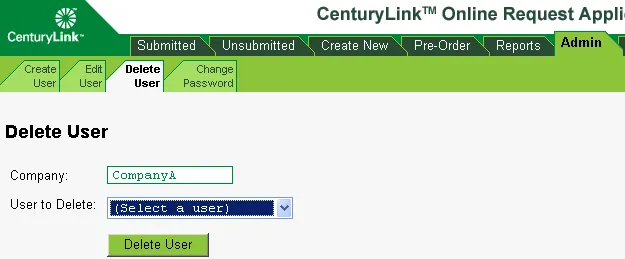
Click the down arrow next to that user and select Remove User.
Confirm the deletion when prompted.
After confirmation, the email account is permanently deleted. There is no recovery window, and the address cannot be reactivated later.
What Happens After Deletion (and What Doesn’t)
Deleting an email user has broader consequences than many people expect:
All emails, folders, and attachments are erased
Login credentials stop working immediately
Forwarding rules and filters disappear
The address becomes unusable for future sign-ups
What doesn’t happen automatically is cancellation of your internet service. Email deletion and service cancellation are two separate actions.
Deleting Email vs. Canceling Service: A Practical Comparison
| Action Taken | What Gets Removed | What Stays Active |
|---|---|---|
| Remove email user | Inbox, login, stored messages | Internet service |
| Cancel internet service | Internet + email (after cutoff) | Account history |
| Inactive for 12 months | Email content deleted | Account shell |
This distinction matters if you’re switching providers but want to keep internet service active temporarily—or if you’re managing email accounts for family members.
Special Cases You Should Know About
Some users run into issues because of older account types or inactivity rules.
Former @q.com addresses
Older @q.com emails were migrated years ago to @myctl.net. If you’re searching for an old address and can’t find it, make sure you’re managing the migrated version, not the legacy one.
Inactive accounts
CenturyLink automatically deactivates email accounts that haven’t been signed into for about a year. In those cases, your emails may already be gone—but the user profile could still appear until manually removed.
A Real-World Scenario That Catches People Off Guard
Imagine this: you cancel your CenturyLink internet after moving, assuming the email will vanish on its own. Months later, you discover that old address is still tied to password resets on banking or shopping sites—but you can’t access it anymore. This creates a security blind spot that’s frustrating to fix.
That’s why deleting the email intentionally—before or immediately after service changes—is far safer than letting it expire silently.
One Personal Insight from Experience
When I helped a family member clean up legacy accounts after switching providers, we discovered an unused CenturyLink email still linked to critical online services, which reinforced how important proactive deletion really is.
Why People Choose to Delete Instead of Ignore
Many users assume abandoning an email is enough. In reality, deleting it properly offers clearer benefits:
Reduces exposure to account takeovers
Prevents forgotten recovery emails from lingering
Simplifies digital identity management
Eliminates confusion during future service changes
Unlike cloud-based email providers, ISP emails age poorly once you leave the service.
What to Do Before You Click “Delete”
To avoid regrets, take five minutes to prepare:
Export or forward important emails
Update email addresses on banks, social media, and subscriptions
Save contacts you may need later
Confirm you’re deleting the correct user
Once the deletion is confirmed, there’s no rollback—even through customer support.
If You Can’t Find the Delete Option
Sometimes the “Remove User” button doesn’t appear. This usually means:
You’re logged into a sub-user account, not the primary one
The account is already deactivated
Service changes are pending
In these cases, signing into My CenturyLink or contacting support directly is the fastest resolution.
Conclusion
Knowing how to delete a CenturyLink email account isn’t just about following steps—it’s about understanding what’s connected, what’s permanent, and what protects your digital life long-term. Whether you’re downsizing accounts, switching providers, or tightening security, removing unused ISP email addresses is a smart, often overlooked move.
Handled properly, the process is straightforward. Handled casually, it can leave behind loose ends you didn’t expect. A few intentional steps today can save hours of frustration later.
FAQs
Can I recover a deleted CenturyLink email account?
No. Once deleted, the email address and all its data are permanently removed.
Does deleting my email cancel my internet service?
No. Email deletion and service cancellation are separate actions.
How long does deletion take?
Deletion is usually immediate, though system updates may take a few minutes to fully propagate.
What if I no longer have access to my CenturyLink account?
You’ll need to contact customer support to verify ownership before any changes can be made.
Is it better to delete or let the account go inactive?
Deleting is safer. Inactivity can leave partial access issues and security gaps.